Securing the Issuance Source: Why Document Security Demands Centralized 2FA Enforcement
- Qryptal Team
- Nov 15, 2026
- 4 min read
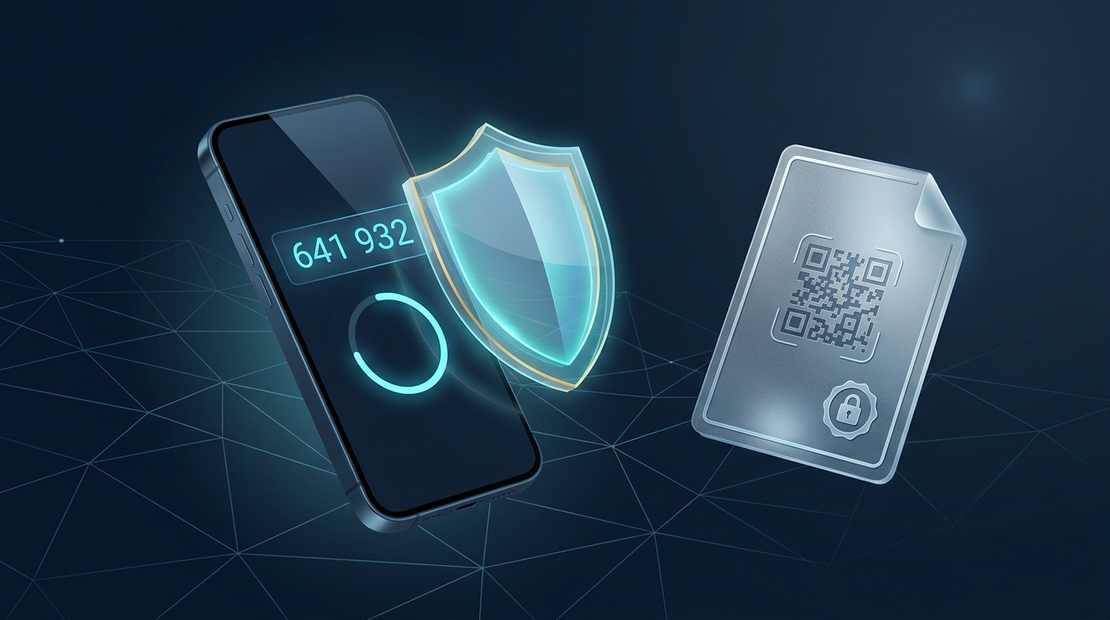
A tamper-proof document is only as secure as the credentials used to create it.
When institutions issue tamper-proof certificates, bank guarantees, medical records, or government licenses, trust is everything.
Qryptal ensures that any document issued with our Secure QR Code can be verified instantly by anyone, anywhere—online or offline. But in information security, protecting the final document is only half the battle. You must also protect the source of issuance.
If an employee’s login credentials are compromised through phishing or password reuse, unauthorized parties could attempt to generate fraudulent documents under your organization’s name.
Leaving security as an optional personal choice creates organizational blind spots. To close this gap, Qryptal provides Centralized 2FA Policy Enforcement—giving organization leaders built-in controls to mandate, monitor, and govern Time-based One-Time Passwords (TOTP) across their entire team with zero workflow disruption.
Part 1: What is TOTP and Why Does It Matter?
What is TOTP?
TOTP (Time-based One-Time Password) is the open industry standard powering trusted authenticator apps like Google Authenticator, Microsoft Authenticator, 1Password, and Apple Keychain.
Instead of sending verification codes over vulnerable cellular networks, your authenticator app generates a fresh, unique 6-digit code every 30 seconds directly on your device.
- Works Offline: No internet or cellular signal required.
- Instant Expiry: Codes expire in seconds, rendering intercepted codes useless.
- Tamper-Resistant: Cannot be redirected or intercepted through mobile network attacks.
Why Authenticator Apps Outperform Insecure SMS Codes
For years, SMS text messages were the default second factor. Today, modern cybersecurity guidelines and financial regulators worldwide actively advise against SMS for high-value systems:
- SIM-Swapping Attacks: Attackers can trick mobile carriers into transferring a phone number to a new SIM card, intercepting incoming SMS verification codes.
- Network Interception: SMS messages travel in plain text across cellular networks and can be captured by rogue towers or mobile malware.
- Delivery Delays: SMS relies on international telecom routing, often leading to delayed messages when team members travel.
TOTP authenticator apps eliminate every one of these vulnerabilities. The verification stays safely inside your trusted device.
Part 2: Why “Optional” Security Leaves Teams Vulnerable
For an individual, two-factor authentication is good personal hygiene. But for any organization issuing high-value credentials, optional security is an open door.
In any organization, security is only as strong as the least-protected account:
- An attacker doesn’t need to breach an executive’s account if they can compromise a single team member with issuance privileges.
- When organizations undergo vendor risk assessments, banking compliance reviews, or annual security audits, auditors require proof that multi-factor authentication is centrally mandated and strictly enforced across 100% of users.
Centralized enforcement eliminates human error. It ensures that every team member accessing the document portal is protected by a verified second factor.
Part 3: How Centralized 2FA Enforcement Works in Qryptal
Qryptal’s centralized 2FA enforcement is designed to provide robust security with zero operational friction.
1. Activate the Organization Mandate in One Click
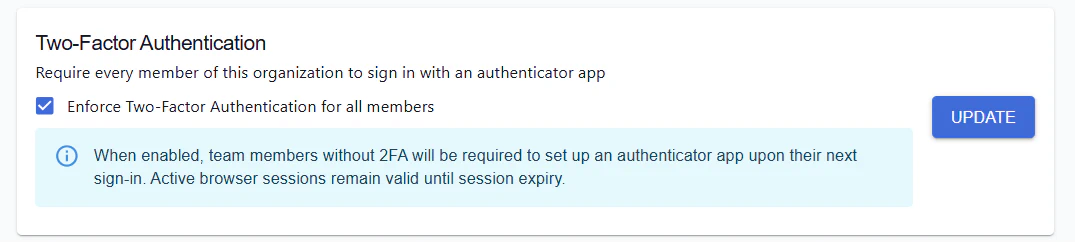
Organization Owners and Admins can enable policy enforcement directly from the dashboard:
- Navigate to Organization Settings ➔ Setup.
- Toggle on “Enforce Two-Factor Authentication for all members”.
- Click Update.
2. Zero Workflow Disruption
Enabling the mandate never terminates active browser sessions. Your team members continue their work uninterrupted, and will be prompted to link their authenticator app on their next sign-in.
3. Real-Time Compliance Visibility
Admins no longer need to guess who has compliant security enabled:
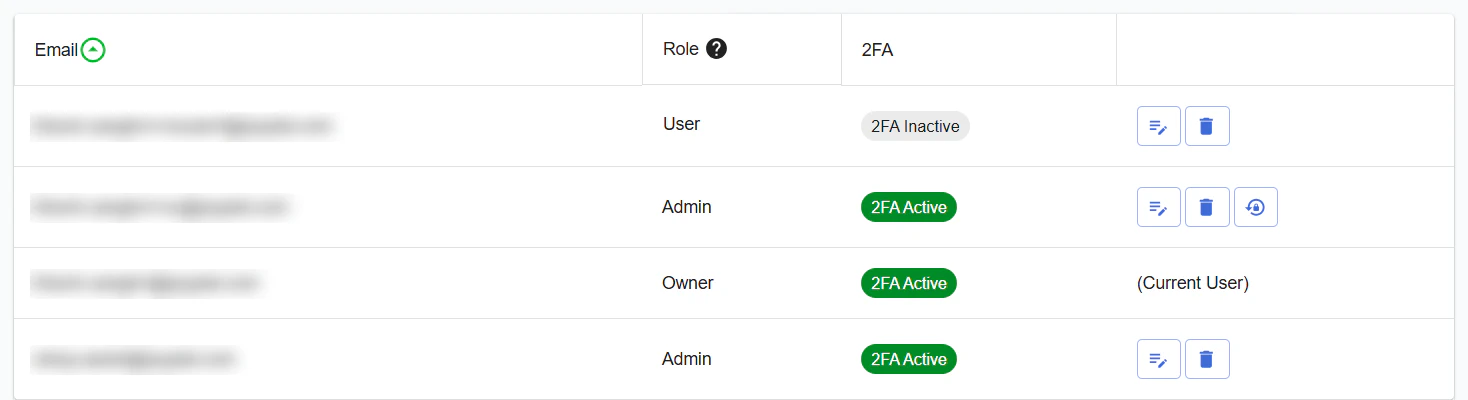
- The Users directory displays live badges for every member:
- 2FA Active (Green): The user has confirmed their authenticator device.
- 2FA Inactive (Gray): The user has not yet enrolled.
- Compliance officers can verify 100% team-wide adherence at a glance.
4. Safe Emergency Recovery
If an employee loses or replaces their phone, business continuity does not grind to a halt:
- Single-Use Backup Codes: Every user receives emergency backup codes upon setup, allowing sign-in even without their phone.
- Controlled Admin Reset: If needed, an authorized administrator can securely reset a member’s 2FA with mandatory password re-authentication, role-based protection, and automated security alerts.
Part 4: How Team Members Set Up Their Authenticator App (Quick Guide)
Setting up an authenticator app takes less than 60 seconds:
- Install an Authenticator App: Download Google Authenticator, Microsoft Authenticator, 1Password, or Authy on your mobile device.
- Access Security Settings: In your Qryptal portal, go to Settings ➔ Security & 2FA (or follow the prompt during your next sign-in).
- Scan the QR Code: Open your app, tap Add Account, and scan the QR code displayed on your screen.
- Confirm with a 6-Digit Code: Enter the current code from your app to activate 2FA.
- Save Your Backup Codes: Store your emergency recovery codes in a secure place (like your password manager) in case your phone is ever lost.
Building Institutional Trust, From Login to Verification
Protecting document integrity requires security at both ends: cryptographically verifiable signatures on the documents you issue, and robust access governance for the teams who issue them.
Ready to harden your organization’s document security?
- Existing Customers: Log in to your Qryptal Dashboard and navigate to Organization Settings to enable 2FA policy enforcement today.
- Prospective Organizations: If you are looking to issue secure, tamper-evident documents with robust team access governance, speak with our technical team.